Structured reporting with checklists for 27 CT and MRI protocols
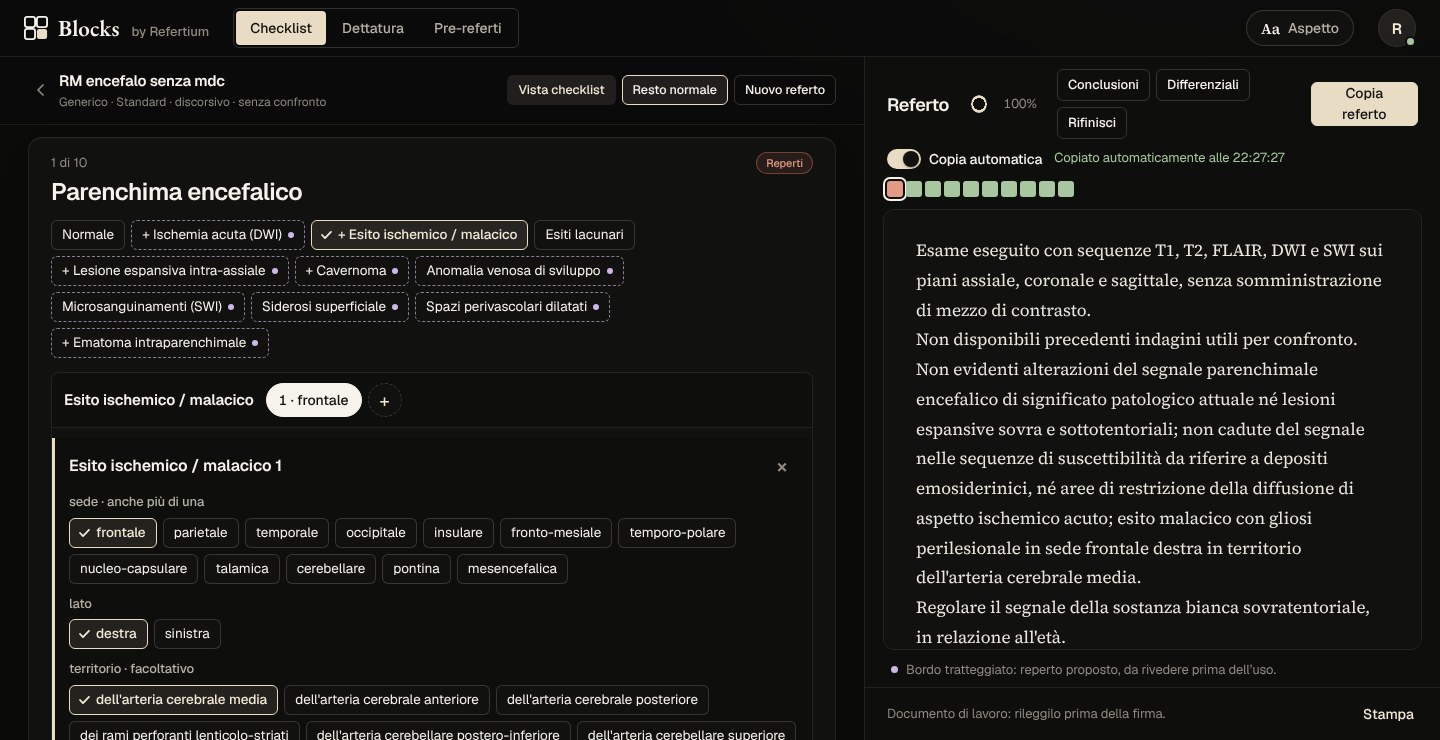
Pick the exam and Blocks opens the checklist of anatomical structures to report, one block each. For each structure press “Normal” if it's regular, choose a finding and fill in its fields, or write free text. The report writes itself on the right as you click.
How it works
- Open the Checklist and pick the exam, for example brain CT, then the clinical profile, the format (narrative or by sections), the technique and the contrast medium with its ml.
- For each structure: “Normal” in one click, a finding with guided fields (site, measurements, side…), or free text, typed or dictated. “Rest normal” fills in everything left.
- If there's a prior exam, mark each finding as new, unchanged, decreased or increased: the report writes the comparison sentence. In spine exams, free text gets the level automatically (“L4-L5: …”).
- The report is composed in clinical Italian and copied to the clipboard automatically, ready for the RIS; add the conclusions with “Conclusions”.
Available exams
CT
Chest and abdomen · Chest · Complete abdomen · Brain (with or without contrast) · Post-operative brain · Cervical spine · Lumbar spine · Brain and cervical spine
MRI
Brain (with or without contrast) · Brain mass lesion · Post-operative brain · Cervical, thoracic and lumbar spine (with or without contrast) · Knee · Shoulder · Ankle · Hip / pelvis · Wrist · Hand / fingers · Elbow
There are no checklists for ultrasound, X-ray or mammography. Free dictation works for any report, ultrasound included.
Your phrases, not ours
Alongside the checklist, your own phrases live in Templates (Pre-referti): ready texts such as “negative brain CT”, grouped and saved in your account, so you find them on any computer. In the onboarding call we prepare them with you, together with your personal dictionary. None of this contains patient data: only the way you report.
What it doesn't do
It doesn't fill in structures by itself by looking at images. Normal sentences are standard and you choose them; abnormal findings are described by you, and suggested findings shown with a dashed border must be reviewed before use.
Frequently asked questions
How many exams have a checklist?
27 CT and MRI protocols, with 184 anatomical structures, 672 findings with guided fields and 4 clinical profiles (generic, trauma, oncologic staging and follow-up, non-traumatic emergency). There are no checklists for ultrasound, X-ray or mammography: for those, use free dictation.
Can I use my own phrases for normals?
Checklist normals are standard sentences. Your own phrases go into Templates (Pre-referti): saved in your account, copied in one click, and you can save a dictated report as a template.
Are conclusions written automatically?
The AI suggests them when you press “Conclusions”, based on the findings. You can edit them, and they go into the report only when you insert them.